
Data and privacy
Understand local storage, network requests and cleanup actions.
Where data is stored
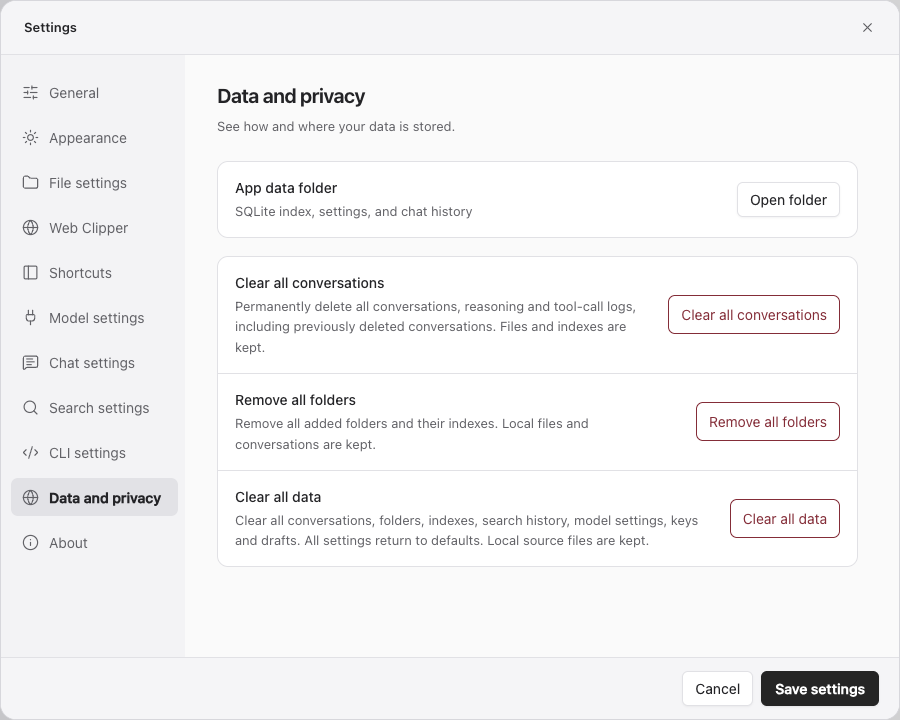
Location: Settings → Data and privacy → Application data location → Open directory.
The application data directory stores SQLite indexes, folder records, settings, model keys, conversations, citations, tool logs and drafts. Different installation methods may use different directories; open it from the app you are actually using.
Original files stay in the folders you added. Editing and saving Markdown changes the original file. Removing an index or uninstalling the app is a different operation.
Network requests
| Operation | Data flow |
|---|---|
| Native text indexing, quick search, browsing, local relationship graph | Local processing; no answer model or Jev required |
| SAG2 deep search and CLI semantic search | Questions, candidate passages and necessary context go to the configured Jev service |
| Q&A | Questions, relevant history, tool results and citations go to the answer model; retrieval also uses Jev |
| Automatic search summaries | Questions and selected results go to the answer model |
| External MCP | Accesses local or remote resources according to the tool parameters and service |
| Updates, conversion components and recognition models | Downloads files from the relevant distribution service |
Keys are kept in files accessible to the current user. Other processes running as that user may still read them. Remove keys and sensitive content before sharing logs or application data.
Cleanup actions compared
| Action | Removes | Preserves |
|---|---|---|
| Clear all conversations | All conversations, reasoning and tool-call logs, including previously deleted conversations | Original files, knowledge base and indexes, model settings and keys |
| Remove all folders | All registered folders and their indexes | Original files, conversations, drafts and model settings |
| Clear all data | Conversations, folders and indexes, search history, model settings, keys and drafts; resets settings | Original files |
| Uninstall conversion components | SAG-managed Docling, its runtime, recognition models and download cache | Original files, .sag-converted files and existing indexes |
The first three actions are under Data and privacy and each requests confirmation. Conversion removal is under File settings → Other formats. Cancelling the settings dialog cannot undo a confirmed cleanup.
Index disk usage
SQLite indexes and log files are stored in the application data directory. Removing all folders triggers index-space reclamation; original document directories and conversations are managed separately. Adding the folders again requires reindexing.
Do not manually delete database or log files while the application or shared service is writing them. Use the corresponding application action.
Limit data access
Add only folders you need, exclude sensitive files with .sagignore, and narrow the query scope when appropriate. Bind only necessary external MCP tools to each model. See Folders and indexing and MCP and tool bindings.