Tools & MCP
Choose built-in tools and external MCP servers per answer model.
Location and scope
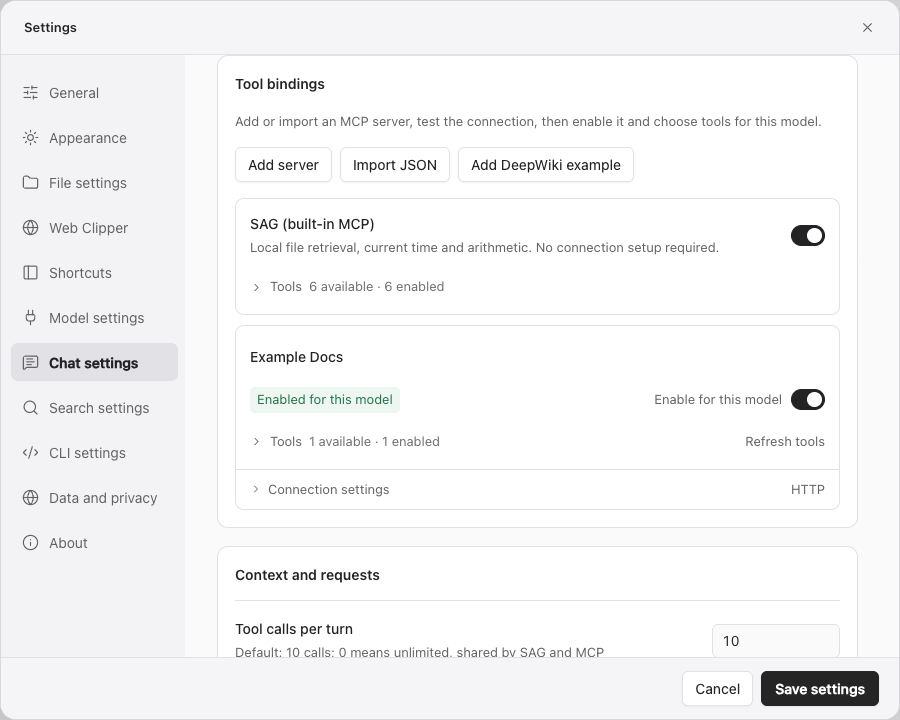
Location: Settings → Q&A settings → Tool bindings. Select the answer model first. Each model keeps its own server bindings and enabled tools.
External server connection details can be reused by multiple models. Each model independently selects which servers and tools it may use.
Built-in SAG tools
Enable SAG (built-in MCP) without additional connection settings. Expand its tool list to enable or disable individual tools.
| Tool | Purpose |
|---|---|
search | Retrieve source passages with SAG2 from a natural-language question; requires Jev |
list | Find files and directories within the registered scope |
read | Read source text at a known path and location |
grep | Match keywords or patterns in file content |
getTime | Get the current time |
calculate | Perform calculations |
File tools respect the current query scope. Disabling the entire group prevents that model from retrieving the local knowledge base through these tools. Availability does not require a call on every turn. Calls are unlimited by default; setting a Q&A limit greater than 0 applies that shared limit to all tools.
Add an external server
Select Add server, or Add DeepWiki example for a preset connection. Fill in the dialog and select Add server. Headers, environment variables and confirmation controls are under Advanced settings. Test the example before use.
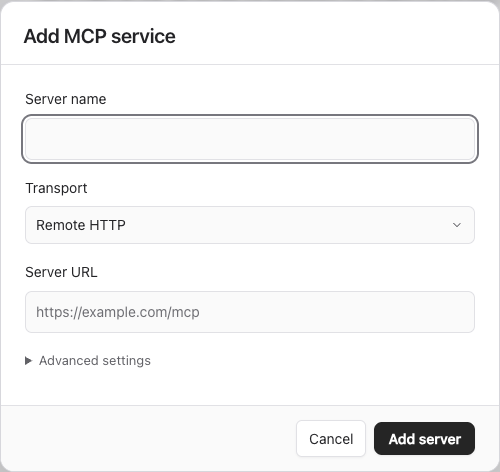
| Field | Value |
|---|---|
| Server name | A display name that distinguishes the server |
| Connection type | Remote HTTP or local command (stdio) |
| Server URL | The actual HTTP MCP endpoint |
| Command | The stdio executable or command; use a full path when needed |
| Arguments | One argument per line |
| Headers | An HTTP JSON object, such as authentication headers |
| Environment variables | A stdio JSON object with string values |
| Confirm before calling | Show the tool name and arguments for user approval |
Leave headers or environment variables blank to keep saved values. Enter {} to clear saved credentials. Retest and fetch the tool list after editing connection details.
Test, bind and select tools
- Fill the connection and select Test connection to retrieve tools.
- Enable its binding for the current model.
- Expand the tool list and enable only the tools you need.
- Select Save settings.
- After server changes, use Refresh tool list and review enabled tools.
A successful connection test does not guarantee correct model use of every tool. External tools may access networks or modify external resources; configure confirmation according to their capabilities.
Import JSON
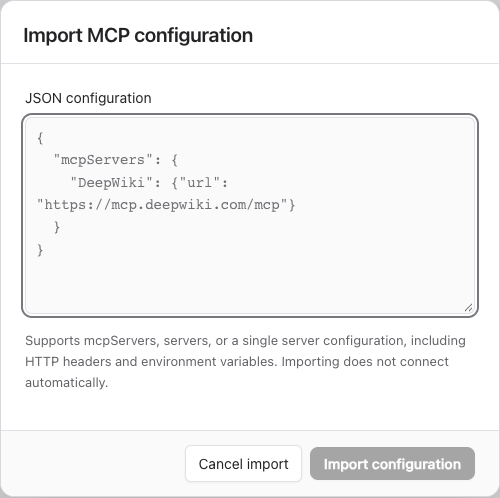
The importer accepts mcpServers, servers or a single server object. This public example is supplied by the app:
{
  "mcpServers": {
    "DeepWiki": {
      "url": "https://mcp.deepwiki.com/mcp"
    }
  }
}
Select Import JSON, paste the configuration in the dialog and select Import configuration. Importing does not connect automatically. Rename duplicate server names. Streamable HTTP and stdio are supported; SSE, inputs and unresolved variable placeholders are not. Keep real configurations containing keys out of public documentation.
Remove a server
Remove server removes the connection and its model bindings when settings are saved. It does not uninstall the external program or delete data in the external system.
Connection dialogs
Add server and Import JSON open separate dialogs. After adding a server, test its connection and enable it for the current model. Removing a server asks for confirmation; the removal notice offers an undo action.