
Agents
Give your agent access to SAG Wiki project search.
One setup instruction
Send this entire instruction to Claude Code, Codex or OpenCode:
Install https://github.com/Zleap-AI/SAG-Wiki/blob/main/cli/skills/sag/SKILL.md and follow its setup flow for my current project.The Skill guides the agent through checking the CLI, installing all Skill files, configuring Jev, adding the current project and verifying a search. The desktop app is optional.
API key setup
Install the CLI manually
npm install -g @zleap-ai/sag
sag --version
sag
Running sag for the first time guides Jev setup. Existing installations and settings are reused.
Use it in your project
sag add --types md,txt,html,py,js,ts,tsx,json,yaml
sag check
sag "How does this project handle login and permissions?" . -m 5
Adjust --types to match your project. Wait for indexing before searching. Results identify files, source locations and relevant content that the agent can read further.
Skill locations
| Agent | User-level directory |
|---|---|
| Codex | ~/.agents/skills/sag/ |
| Claude Code | ~/.claude/skills/sag/ |
| OpenCode | ~/.config/opencode/skills/sag/ |
Include SKILL.md and all companion files under references/. Use the GitHub Skill as the canonical source.
Shared with the desktop app
Agents call SAG through the CLI. Desktop and CLI share configuration, folders and indexes, so indexing is not duplicated. Retrieving relevant passages can reduce the need to put entire documents in context. Actual token use and efficiency depend on the task and agent workflow.
CLI settings in the desktop app
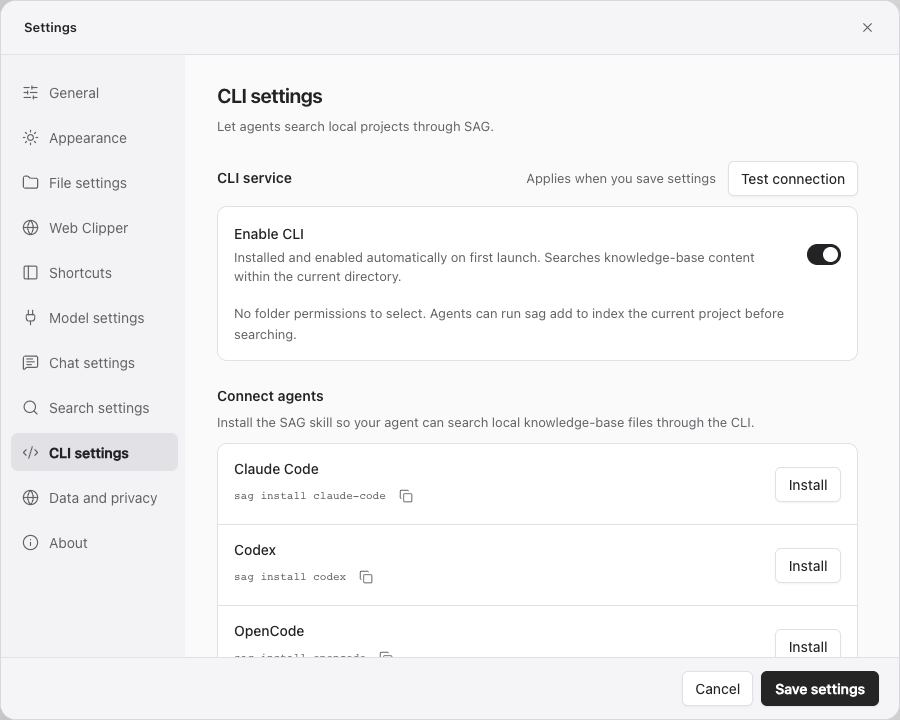
Location: the plug icon for Connect Agent at the top right, or Settings → CLI settings. Hover over the icon to see its name.
| Item | Purpose | Usage |
|---|---|---|
| Enable CLI | Allow CLI access to the shared local service | First desktop launch installs and enables it. Save after changing the switch. |
| Test connection | Check CLI-to-service connectivity | Save switch changes first. Connectivity does not prove project indexing is complete. |
| Install for Claude Code / Codex / OpenCode | Install that agent's SAG Skill | Select Install; installed integrations can be removed. Start a new agent session to load the Skill. |
| Copy installation command | Copy the corresponding sag install command | Run it locally or give it to the agent. |
| Other → Download SAG Skill | Save the complete Skill folder | Place it in another agent's Skills directory manually. |
| Skill installation guide | Show setup steps and the actual location | Expand to inspect where files are installed. |
| CLI usage guide | Basic commands, project scope and status checks | See the full CLI reference. |
No separate per-folder CLI authorization selection is required. Search still covers only indexed content beneath the current path and respects exclusions. Disabling CLI affects agent access without deleting originals or indexes.
When installing from GitHub, follow the linked current setup flow and fetch every Skill file. A desktop-bundled Skill is a snapshot shipped with that app version.