
Models
Configure and test the answer model and Jev separately.
Model responsibilities
Location: Settings → Model settings.
| Configuration | Purpose | Required for |
|---|---|---|
| Answer model (LLM) | Write answers, call tools and summarize search results | Q&A and enabled search summaries |
| Jev model | Judge whether candidate passages provide necessary evidence | SAG2 deep search and CLI semantic search |
Local indexing and quick search need neither model. Jev alone enables semantic retrieval. An answer model alone cannot perform SAG2 retrieval that depends on Jev.
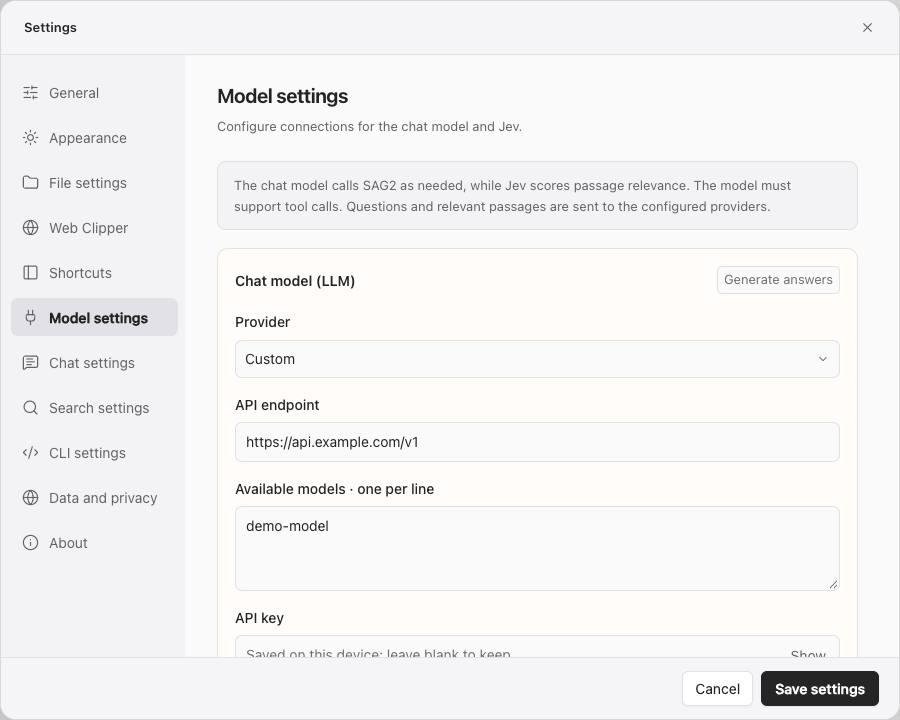
Configure each field
Provider
Selecting a provider fills its endpoint. Answer providers include OpenAI, DeepSeek, GLM, OpenRouter, 302.AI and Custom. Jev providers include 302.AI, OpenRouter, Typesafe and Custom.
Answer generation and Jev judging use different APIs. Endpoints are not interchangeable simply because they share a provider. A custom service must support the relevant API.
Endpoint
Enter the API base URL provided by the service, not its web chat address. Presets fill this automatically. For a proxy or self-hosted service, check its path and protocol.
When switching to a different service origin, supply that provider's API key. The app does not automatically reuse the previous provider's key with the new origin.
Jev accepts a base URL such as http://127.0.0.1:8000/v1, or a complete /systemone or /decisions endpoint. The endpoint suffix is not added twice.
Jev authentication
- API Key: use for services that require a key. Existing configurations retain this default.
- No authentication: use for local Jev services that do not require a key. No authorization header is sent, and saving removes the previously stored Jev key.
The service must implement the Jev judging API. For the CLI, use sag config --url http://127.0.0.1:8000/v1 --model YOUR_MODEL --auth none. Switch back to a keyed service with --auth bearer --key-stdin.
Available models and model name
Available models · one per line controls the answer models shown in the UI. Enter an exact supported model ID on each line, without commas. Duplicates are removed on save. Connection testing uses the first entry.
For Jev, enter one model ID in Model name. The current default is jev-latest; verify availability with your provider.
API key
Enter the key for the selected service. The field is hidden by default; use Show or Hide to inspect it. Leaving a saved field blank preserves its key. Remove saved key deletes that key immediately.
When both providers are 302.AI, entering a key can fill the other unconfigured field automatically. Review both configurations before saving.
Test connection
Use Test connection on each card to verify the endpoint, model and key. Then select Save settings. Tests may send validation requests and incur provider charges.
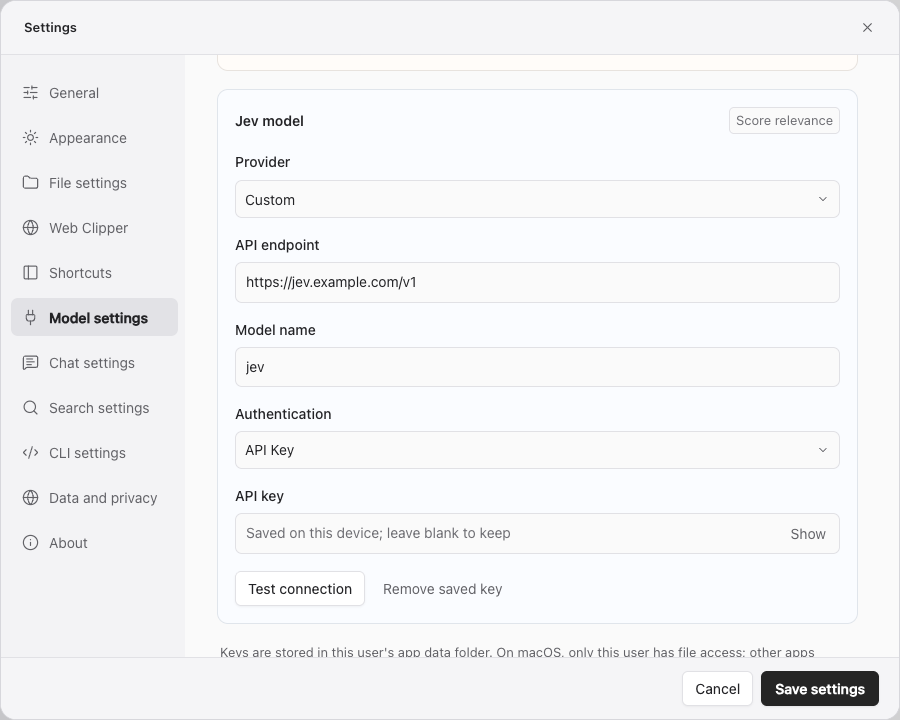
Setup sequence
- Configure Jev, test it, save and run a deep search.
- Configure and test an answer model that supports tool calling.
- Save, select that model in Q&A and ask a question with verifiable sources.
- Adjust prompts, reasoning or tool permissions under Q&A settings.
Connection problems
- Authentication failure: check the provider, key and expiry.
- Unknown model: verify the exact ID and account access.
- Invalid endpoint: check the API URL and required path.
- Timeout: check the network and provider status; Q&A request timeouts are adjusted in Q&A settings.
- No tool calls: verify that the model and API support tools, then check that model's bindings.
Keys are stored in the current user's application data directory. macOS uses owner-only file permissions; other processes running as that user may still read them. Do not publicly share the data directory. See Data and privacy.